
When Google Forms Is Not Enough for Event Registration
May 8, 2026
Introduction
For small and simple events, Google Forms can be a fast way to collect RSVP data. It is easy to use, familiar to most teams, and requires almost no setup.
But once an event becomes more serious, Google Forms often starts to feel limited. Teams begin dealing with manual data handling, inconsistent branding, slow guest verification, and no clear connection between registration and on-site check-in.
If your event needs a smoother guest journey, better control, and a more professional setup, this is usually the point where Google Forms is no longer enough for event registration.
In this article, we explain where Google Forms works, where it starts to break down, and when a custom event registration system becomes the better solution.
Why Teams Start with Google Forms
There is a reason many teams use Google Forms for event registration at the beginning. It is simple, free, and quick to deploy.
For basic use cases, it can be enough to:
- collect names and contact details
- gather RSVP responses
- share one form link to invited guests
- review submissions in a spreadsheet
For internal gatherings or low-complexity events, this setup may still be acceptable.
The problem appears when the event experience becomes more demanding.
The Real Problems That Show Up on Event Day
A registration system is not only about collecting names. It affects the first impression guests have when they arrive.
When Google Forms is used for events with higher traffic or more complex workflows, these problems often start to appear:
- registration data is stored, but not connected to a proper check-in flow
- guest verification still happens manually
- staff need to search names one by one in spreadsheets
- branding feels disconnected from the event identity
- there is no unique QR code for each attendee
- organizers struggle to monitor attendance in real time
- multiple staff members cannot work efficiently in the same workflow
- reporting after the event becomes messy and manual
This usually creates friction at the worst possible moment: guest arrival.
A long queue at the entrance, duplicate records, or slow manual validation can make an event feel less organized, even if everything else inside the venue is prepared well.
Where Google Forms Starts to Fall Short
Google Forms is useful as a form builder, but event registration usually needs more than a form.
Here are common situations where Google Forms is no longer enough:
1. You Need a Branded Registration Experience
For corporate events, brand activations, and client-facing experiences, the registration flow is part of the event itself. A plain form often feels too generic.
A custom event registration system can include:
- branded invitation microsites
- custom form design
- event-specific confirmation pages
- on-brand communication flow from registration to check-in
2. You Need QR Code Check-in
One of the biggest limitations of Google Forms is that it does not provide a complete QR code event check-in workflow by default.
If you want each attendee to receive a unique QR code, then be verified instantly on-site, you usually need a more tailored system.
A custom registration system can generate a unique QR code per guest and connect that code directly to the check-in dashboard.
3. You Need Faster On-site Operations
Google Forms may collect the data, but it does not solve the operational side of event entry.
At larger events, staff often need:
- instant attendee verification
- duplicate scan prevention
- multi-device check-in access
- real-time attendance visibility
- faster queue handling
This is where a custom event check-in system becomes much more practical.
4. You Need Real-time Attendance Tracking
With Google Forms, registration data may exist, but the organizer still has to piece together what is happening manually.
A custom system can show:
- how many guests are registered
- how many have checked in
- who is still pending
- which session or category they belong to
- what is happening live during the event
This gives event teams much better visibility and control.
What a Custom Event Registration System Solves
A custom event registration system is built around the full registration journey, not just the form.
Instead of only collecting data, it connects multiple parts of the event flow into one system:
- registration form
- guest database
- QR code generation
- invitation or confirmation delivery
- on-site check-in dashboard
- live attendance monitoring
- post-event reporting
This is especially useful when the event has operational, branding, or reporting needs that generic tools cannot handle well.
How a Custom Registration Workflow Usually Works
A custom event registration system with QR code check-in usually follows this workflow:
Step 1: Guest Registration
Guests open a branded registration link or invitation microsite and submit their details through a mobile-friendly form.
Step 2: Data Validation and Storage
The system stores attendee data in a structured database, making it easier to manage guest information cleanly.
Step 3: QR Code Generation
Each attendee receives a unique QR code connected to their registration record.
Step 4: Confirmation Delivery
The QR code can be delivered through email, WhatsApp, or another communication channel depending on the event workflow.
Step 5: On-site Check-in
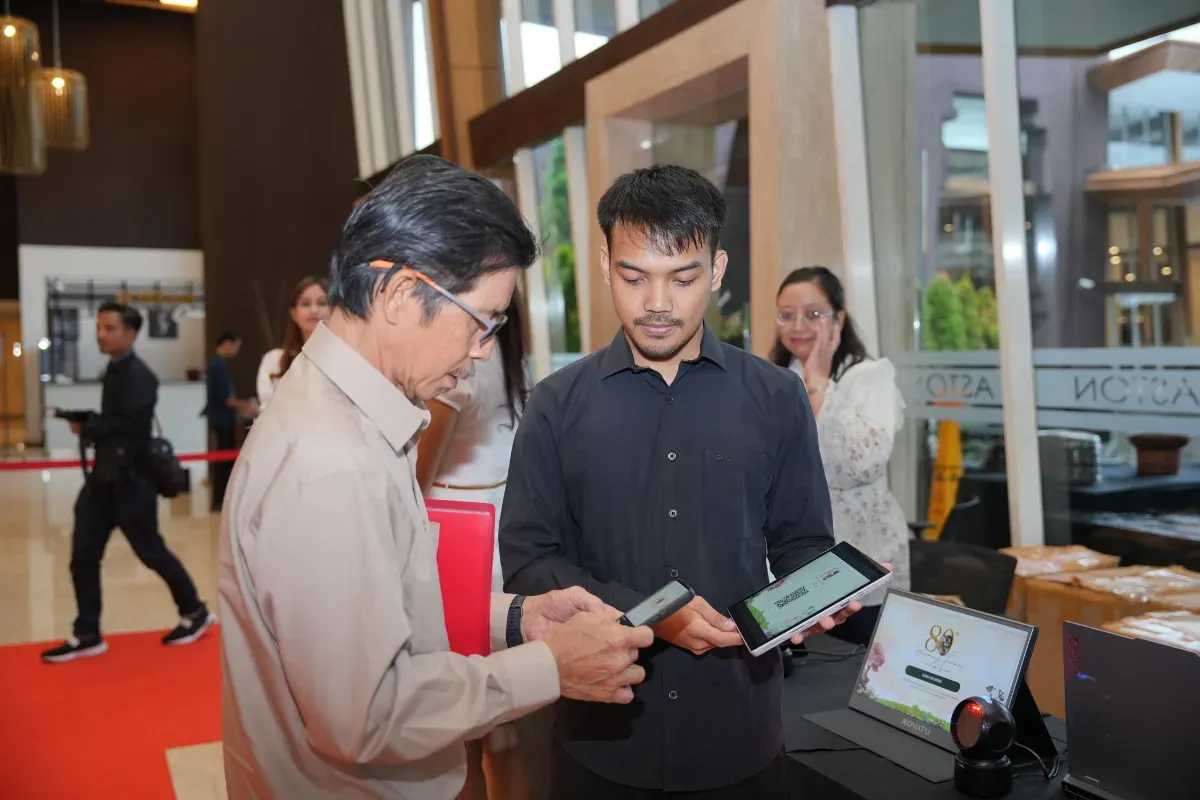
At the venue, staff scan the QR code using a tablet, scanner, or web-based dashboard. The system verifies the attendee instantly and marks them as present.
Step 6: Real-time Dashboard Monitoring
Organizers can monitor attendance live, track guest status, and review data without waiting until the event ends.
This end-to-end workflow is what makes a custom event registration system much more suitable for higher-stakes events.
When a Custom Event Registration System Is the Better Choice
Google Forms may still be enough for a simple RSVP list.
But a custom event registration system is usually the better option when you need:
- a more professional and branded registration flow
- QR code check-in for faster event entry
- better guest experience at arrival
- real-time attendance dashboard
- multiple staff handling check-in simultaneously
- cleaner data management
- post-event reporting in a usable format
- a system tailored to your event workflow
If your team is already spending extra time fixing manual issues around registration, that is often a strong sign that a custom solution would save time and reduce stress.
Mini Use Case: From Basic Form to Operational System
Imagine a corporate event with several hundred guests across multiple time slots.
At first, Google Forms seems enough. The team shares the RSVP link, responses come in, and everything looks manageable.
But closer to event day, new requirements appear:
- guests need confirmation messages
- the client wants a branded registration flow
- the event team needs QR code check-in
- multiple staff members need access to attendance data
- organizers want to monitor arrival status live
At this point, the problem is no longer just registration. The problem becomes event operations.
This is where a custom event registration system becomes more than a nice addition. It becomes the infrastructure that keeps the front-of-house experience smooth.
Choosing the Right Tool Based on Event Complexity
A good way to think about it is this:
Google Forms is often enough for:
- internal RSVPs
- small community events
- low-volume gatherings
- simple data collection without operational complexity
A custom registration system is usually better for:
- corporate events
- brand activations
- exhibitions
- conferences and seminars
- multi-session events
- high-volume guest check-in
- events that need branded guest experience and live reporting
The right choice depends on the level of control, speed, and professionalism your event needs.
Conclusion
Google Forms is not a bad tool for event registration. It is simply built for simple use cases.
When your event needs branded registration, QR code check-in, real-time attendance tracking, and a smoother guest journey, Google Forms starts to show its limits.
That is usually the point where a custom event registration system becomes the smarter solution.
If your team wants a registration flow that feels faster, cleaner, and more aligned with the event experience, it may be time to move beyond spreadsheets and generic forms.
If you are planning an event and need a more reliable registration and check-in workflow, explore our custom event registration system service or contact us.